 how-to
How to Reset a 2026 Ford Mustang Infotainment System
Last Updated: October 25, 2026
Quick Summary
A Mustang infotainment reset starts with a soft reboot: with the vehicle in Park and ignition on, hold the steering-wheel button combination for about 10 seconds and release when the screen goes black. This restarts SYNC in roughly 30 seconds and keeps all saved data. Only try a factory reset if the soft reboot fails.
- A soft reboot restarts SYNC and keeps all saved data, while a factory reset erases paired phones and profiles.
- The 2026 Mustang has a 13.2-inch center touchscreen running SYNC 4.
- Release the buttons once the screen goes black; holding 30 seconds or more can trigger a deeper reset cycle.
- The factory reset path is Settings, General, Reset, then Master Reset.
- Two failed factory-reset attempts is the signal to book service.
Table of Contents
- Before You Reset: What the 2026 Mustang Screen Actually Does
- Soft Reboot vs. Factory Reset: Know the Difference
- How to Perform a Ford SYNC Soft Reset
- Ford Mustang Frozen Touchscreen Fix: Safe Steps to Try First
- Ford SYNC Black Screen Troubleshooting
- 2026 Mustang SYNC Factory Reset: Steps and What Gets Erased
- Post-Reset Setup: Reconnecting Phones, Profiles, and Settings
- When a Reset Won't Fix It: Get Your Mustang Checked
- Frequently Asked Questions
Before You Reset: What the 2026 Mustang Screen Actually Does
A 2026 Mustang technology guide lists a 13.2-inch center display, and that screen runs far more than music. It handles navigation, phone pairing, climate shortcuts, and vehicle settings.
Here is the part most guides get wrong: a reboot and a factory reset are not the same thing. Ford publishes separate instructions for rebooting SYNC and for performing a master reset, and the factory-reset path deletes stored data.
Mustang infotainment reset work starts with knowing which one you actually need. If you want context on what the screen controls before you touch it, our Ford Mustang Buying Guide breaks down the EcoBoost, GT, and Dark Horse trims and their tech features.
Soft Reboot vs. Factory Reset: Know the Difference
A soft reboot is a simple restart of the SYNC system. It clears temporary glitches and keeps all your saved data.
A factory reset wipes the system back to its original state. Paired phones, saved profiles, and preferences are removed.
The distinction matters. A dealer guide for the 2026 F-150 states that its factory reset runs through Settings and deletes data, which shows how much a master reset removes.
Try the soft reboot first. Always.
| Action | What It Does | Data Kept? | When to Use |
|---|---|---|---|
| Soft reboot | Restarts SYNC | Yes, all data stays | Frozen or slow screen |
| Factory reset | Restores factory defaults | No, data is erased | Persistent software faults |
How to Perform a Ford SYNC Soft Reset
A Ford SYNC soft reset restarts the infotainment system without erasing anything. It takes about 10 seconds and fixes most frozen-screen problems. This is the step to try first, before any settings-based reset or battery disconnection.
Step 1: Confirm Your 2026 Mustang's Control Layout
The 2026 Mustang ships with a 13.2-inch center touchscreen running SYNC 4, and the steering-wheel button clusters differ between trims. Before you press anything, verify which layout your car has:
- EcoBoost and GT with the standard wheel: the right-hand cluster carries a Power button and a Seek Right button.
- Dark Horse and cars with the optional wheel: the same two functions are present but the button faces and spacing differ.
Open the owner's manual to the "SYNC" section and look for "Performing a System Reset" or "Rebooting the System." The manual lists the exact combination for your VIN. If you don't have the printed copy, the digital owner's manual in the FordPass app carries the same page.
Step 2: Hold the Combination for 10 Seconds
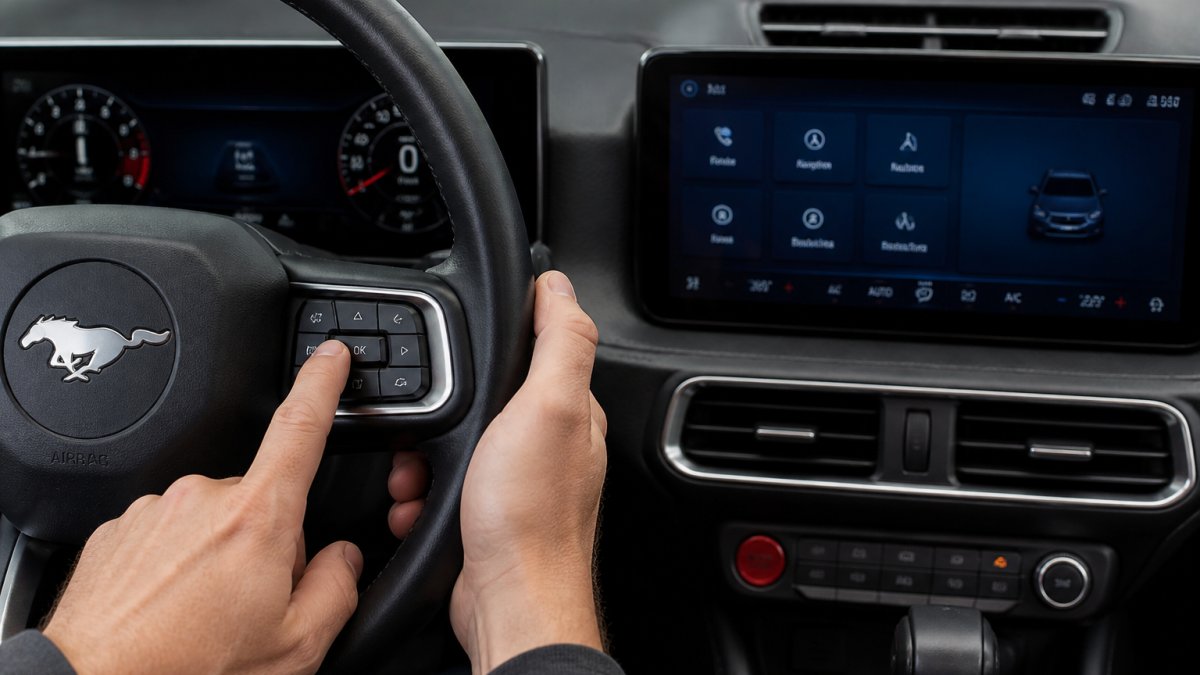
With the vehicle in Park and the ignition on (accessory mode is fine), press and hold both buttons at the same time. Keep holding for about 10 seconds.
Step 3: Release When the Screen Goes Black
The screen will go dark, then the Ford logo appears as SYNC restarts. Release the buttons once the screen goes black. If you release too early, the system may not complete the reboot and you'll be back where you started.
Expected result: SYNC boots back up within about 30 seconds, and your paired phone, profiles, and presets are still there.
If the Screen Never Goes Black
Three things cause a failed soft reboot:
- Wrong button combination. Recheck the manual for your trim. The F-150 uses Power and Seek Right, but that is not proof the Mustang does.
- Buttons pressed one after the other instead of together. The system reads a simultaneous press; a staggered press registers as two separate commands.
- The screen is already dead. A black screen that never lit up at startup is a different fault from a frozen screen. Move to the black-screen section below rather than repeating the reboot.
Ford Mustang Frozen Touchscreen Fix: Safe Steps to Try First
A Ford Mustang frozen touchscreen fix starts with the least invasive option and works up from there. Do not jump straight to a factory reset.
Work through this order:
- Tap the screen once to confirm it is truly unresponsive
- Try the steering-wheel button combination for a soft reboot
- Shift to Park and switch the ignition off, then back on
The battery-cable method is the last step before a factory reset. It means disconnecting the negative terminal, waiting a minute, then reconnecting. Watch out: disconnecting the battery can reset other vehicle settings, so check your owner's manual first and reconnect the negative terminal snugly.
Ford SYNC Black Screen Troubleshooting
Ford SYNC black screen troubleshooting follows the same order as a frozen screen: reboot first, then check power, then escalate. A dark screen usually points to a software issue, not broken hardware.
Start with the soft reboot described above. If the display stays dark, switch the vehicle off completely, open the driver's door to power down the systems, and restart after a minute.
When the Screen Stays Dark After a Reboot
If the screen is still black after two reboot attempts, stop repeating the same step. A screen that never lights up can point to a hardware fault or a deeper software issue. That is a job for a technician with the right diagnostic tools, not something to solve by disconnecting cables in your driveway.
2026 Mustang SYNC Factory Reset: Steps and What Gets Erased
A 2026 Mustang SYNC factory reset, Ford also calls it a master reset, restores the system to its original defaults. It is the right move only after a soft reboot has failed and you have confirmed the problem is software, not a dead screen. It is not a troubleshooting step; it is a last resort before service.
Before You Start
Two checks first:
- Confirm the screen is alive. A factory reset requires you to tap through menus. If the display is black, this path is unavailable, go to the black-screen section above.
- Have your phone and account logins ready. You will need them to rebuild the system afterward, and the reset does not preserve them.
The Menu Path
On 2026 Mustang SYNC 4 builds, the reset lives under Settings → General → Reset → Master Reset. The exact label on the final screen varies by software version, some builds say "Factory Reset," others say "Master Reset", but the location is the same. If your menu does not match, the owner's manual's "Performing a System Reset" page is the authoritative source for your build.
When you tap the reset option, SYNC asks you to confirm. Read the confirmation screen carefully: it lists what will be erased. Tap Confirm, and the system shuts down and restarts on its own.
What Gets Erased
- Paired Bluetooth phones
- Saved driver profiles and seat presets
- Navigation favorites and recent destinations
What Stays
Your vehicle's core driving systems are untouched. A factory reset only affects the infotainment software. It does not affect the engine, transmission, brakes, or driver-assistance calibrations, and it does not roll back over-the-air software updates already installed.
If the Reset Won't Complete
A reset that hangs on the confirmation screen, loops back to Settings, or restarts into the same frozen state points to a software fault the reset cannot clear. Stop repeating it. Two failed factory-reset attempts is the signal to book service, a technician can reflash SYNC or check for a hardware fault that a user-level reset cannot reach.
Post-Reset Setup: Reconnecting Phones, Profiles, and Settings
After a factory reset, you rebuild your setup from scratch. Budget about 10 minutes.
Reconnect in this order:
- Pair your phone through Bluetooth
- Restore your driver profile and seat presets
- Sign back into navigation and music apps
- Re-save radio presets
- Recheck climate and vehicle settings
If the system acts up again right after setup, note what you were doing when it failed. That detail helps a technician trace the software issue.
When a Reset Won't Fix It: Get Your Mustang Checked
Some problems survive every reset. If your screen keeps freezing, going black, or dropping your phone connection after a full factory reset, the cause sits deeper than user settings.
That is when a hands-on inspection makes sense. If your visit lines up with the season, our spring car maintenance checklist covers the other service your Mustang needs. And if a reset has you thinking about a fresh start in a new car, you can shop new Ford Mustangs and see what is on the lot.
Frequently Asked Questions
How long does a Mustang infotainment reset take?
A soft reboot usually finishes in under a minute: the screen goes black, then the Ford logo appears and the SYNC system reloads. A full factory reset takes longer, often several minutes, because it clears stored data and rebuilds the system. Plan to keep the vehicle on and in park during either process, and don't cycle the ignition mid-reset. If the screen hasn't come back after about five minutes on a soft reboot, treat it as a failed restart and move to the troubleshooting steps rather than repeating the button hold over and over.
Will a 2026 Mustang SYNC factory reset delete my paired phone and settings?
Yes. A factory reset is designed to wipe stored data, which includes paired phones, saved radio presets, navigation favorites, and personal profiles. Ford's own F-150 reset guidance states that the factory reset deletes data, and the same expectation applies to the Mustang's SYNC system. Before you run it, note your presets and make sure you know your phone's pairing steps. A soft reset, by contrast, is just a reboot and does not erase anything, so try that first if your only goal is clearing a frozen screen.
What should I do if the Mustang touchscreen stays black after a reset?
If the screen stays dark after a soft reboot, don't keep mashing buttons. First check that the vehicle is fully on and not in a deep sleep state, then try the button combination once more with a clean 10-second hold. If it still won't respond, a battery cable disconnect at the negative terminal is a step some DIYers consider, but it resets more than the screen. When the display remains unresponsive after those steps, it points to a hardware or software issue that needs a dealer diagnosis rather than more resets.
Does a Ford SYNC soft reset fix a frozen screen every time?
No. A soft reset clears most temporary glitches, like a laggy touchscreen or an app that won't close, because it restarts the SYNC software without erasing data. It won't fix a failed display module, a loose connection, or a software bug that returns immediately after reboot. If the same freeze comes back within a day or two, or the screen never recovers, that's your signal to stop resetting and have the system inspected. Repeated resets mask the symptom without solving the cause.
A frozen screen is frustrating, but most cases clear with a simple 10-second reboot. When they don't, our certified technicians at Rusty Eck Ford can diagnose the issue and get your SYNC system working again. We have served Wichita drivers since 1953, backed by Ford's Triple Crown Award and One Ford Elite Dealer status. Schedule service with Rusty Eck Ford and get your Mustang's infotainment system back to normal.