 how-to
How to Use Ford BlueCruise 2026 Features
Table of Contents
- What Is Ford BlueCruise and How It Works
- Prerequisites and System Requirements
- Step-by-Step Activation Guide for BlueCruise Hands-Free Highway Driving
- BlueCruise 1.5 Features and Automatic Lane Change Assist
- Understanding Driver-Facing Camera Monitoring
- Ford BlueCruise Subscription Pricing and Access
- Troubleshooting Common BlueCruise Activation Issues
- Safety Alerts and System Limitations
- Frequently Asked Questions
Last Updated: October 2, 2026
What Is Ford BlueCruise and How It Works
Ford BlueCruise 2026 is a hands-free driving system that lets you take your hands off the wheel on mapped highways. The system combines adaptive cruise control, lane-keeping technology, and driver monitoring to handle steering and speed automatically.
Here's what makes it different from basic cruise control. Traditional cruise control only manages speed. BlueCruise 2026 handles both steering and acceleration. According to Ford's 2026 BlueCruise usage data, drivers have logged 11.3 million miles and nearly 160,000 hours using the system, with an 88% increase in year-over-year adoption.
The technology works through multiple layers. A driver-facing camera monitors your eye gaze and head position to ensure you stay alert. The vehicle's sensors track lane markings and surrounding traffic. When conditions are safe, the system maintains your lane and adjusts speed automatically.
BlueCruise 1.5 adds automatic lane change capability. The system can now initiate lane changes on its own when it detects safe conditions, without requiring you to manually signal. This is a major step forward from earlier versions that required driver input for every lane change.
Prerequisites and System Requirements
Your 2026 Ford must have BlueCruise hardware installed. Not every model comes with it standard. Check your vehicle's specifications or contact a Ford dealer to confirm your truck or SUV includes the necessary equipment.
You'll need a valid subscription to use hands-free features. BlueCruise is not free. The subscription grants access to the system's full capabilities, including automatic lane changes in version 1.5. Pricing varies by model year and subscription length. Visit Rusty Eck Ford's website or call for current subscription rates and available packages.
Your vehicle must also have:
- Lane-Keeping System (LKS) capability
- Adaptive Cruise Control (ACC) hardware
- SYNC infotainment system (2022 or newer)
- Hands-on-wheel detection sensors
- Driver-facing camera system
The road conditions matter too. BlueCruise activates only on divided highways with clear lane markings. Rain, snow, or heavy fog can disable the system temporarily. Damaged or faded lane markings prevent activation.
Your driver's license and age also matter. You must be at least 18 years old to use BlueCruise. Some insurance companies may require additional training or certification. Check with your insurer before relying on hands-free driving for daily commutes.
Step-by-Step Activation Guide for BlueCruise Hands-Free Highway Driving
Activating BlueCruise requires a specific sequence. Skip a step or perform it out of order, and the system won't engage. Follow this process exactly.
Enable Lane-Keeping System and Adaptive Cruise Control
Start by turning on the Lane-Keeping System. Locate the driver assistance button on your steering wheel. Press and hold until you see the lane-keeping indicator light up on your instrument cluster. The light should be white or blue, not red.
Next, activate Adaptive Cruise Control. Use the steering wheel controls to select ACC. Set your desired following distance, most drivers choose the middle setting. Confirm the speed you want to maintain. The system will now match traffic speed automatically while maintaining your chosen distance.
Both systems must be active before BlueCruise will work. If either one fails to activate, check your vehicle settings or contact Rusty Eck Ford for troubleshooting help.
Activate Hands-Free Mode Through SYNC Settings
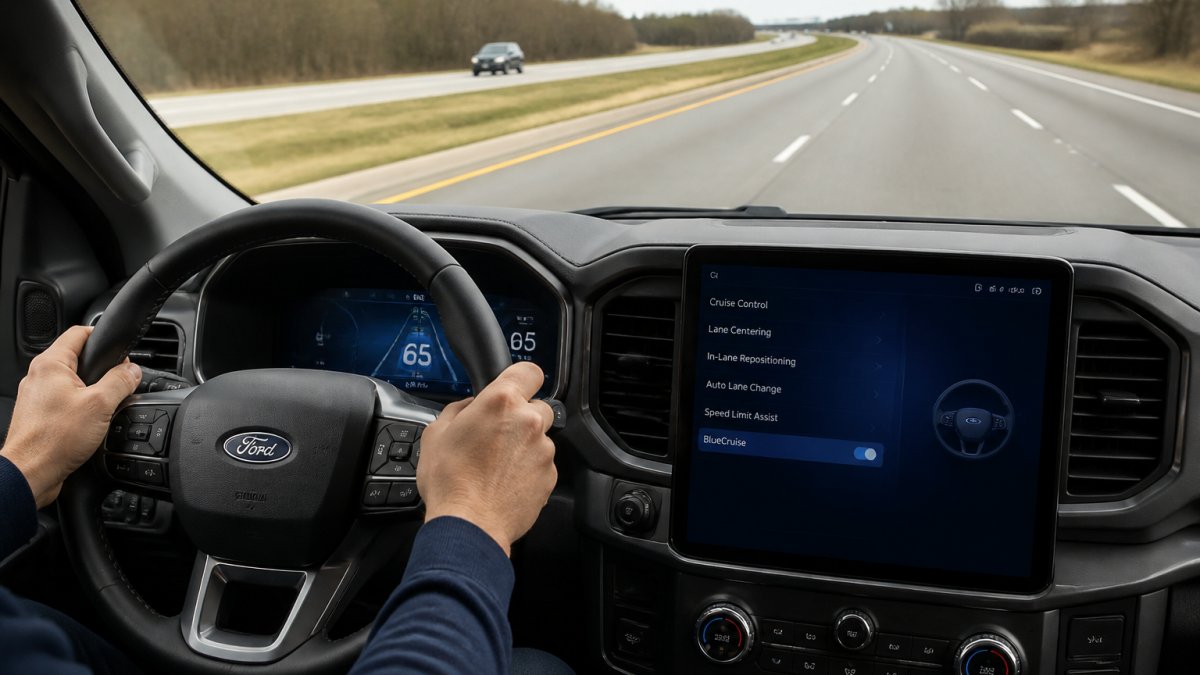
Access your SYNC system through the center touchscreen. Navigate to "Driver Assistance" in the main menu. Select "Lane Centering" and toggle it on. This enables the hands-free steering component.
Find the "BlueCruise" option in the same menu. Toggle it to "On." Your vehicle will now attempt to activate hands-free mode when you meet all requirements.
Some vehicles require you to confirm hands-free activation through a prompt on the dashboard. Read and accept the on-screen warning. This confirms you understand the system's limitations and accept responsibility for monitoring the road.
Confirm You're on a Blue Zone Highway
BlueCruise only works on pre-mapped highways. Your vehicle's navigation system knows which roads qualify. Look at your instrument cluster or SYNC screen. A Blue Zone indicator appears when you're on a compatible highway.
Not all highways are mapped. Interstate highways and major US routes are typically covered. Local roads, state highways, and rural routes usually aren't. If you don't see the Blue Zone indicator, BlueCruise won't activate no matter what you do.
If you're unsure whether your route is mapped, check the Ford BlueCruise map online before you drive. The map shows exactly which road segments support hands-free driving.
BlueCruise 1.5 Features and Automatic Lane Change Assist
BlueCruise 1.5 represents a major upgrade from earlier versions. The biggest addition is Automatic Lane Change Assist. This feature lets the vehicle change lanes on its own when safe conditions exist.
Here's how it works. You don't need to signal or touch the steering wheel. When the system detects an opening in traffic and clear lane markings, it initiates the lane change automatically. The vehicle confirms safety through its sensor suite before moving.
This removes a common frustration with version 1.0. Earlier systems required drivers to manually signal and confirm every lane change. Automatic Lane Change Assist does this work for you, making long highway drives less tiring.
Other improvements in 1.5 include:
- Smoother steering adjustments and fewer overcorrections
- Better handling of curved highway sections
- Improved compatibility with newer SYNC software
- More responsive speed adjustments in traffic
The driver-facing camera also improved. It now tracks eye gaze more accurately and recognizes when you're looking at the road versus distracted. This makes the system safer and reduces false alerts.
Understanding Driver-Facing Camera Monitoring
Your 2026 Ford's BlueCruise system includes an inward-facing camera mounted near the steering column. This camera watches your eyes and head position constantly while hands-free mode is active.
The camera tracks where you're looking. If your eyes drift away from the road for too long, the system alerts you. A gentle vibration in the steering wheel warns you to refocus on driving. Ignore the warning, and BlueCruise disengages for safety.
Head position matters too. The camera detects if your head tilts too far down, to the side, or back. Resting your head on the window or looking at your phone triggers alerts. The system assumes you're not paying attention to the road.
This monitoring serves a critical purpose. Hands-free driving is only safe if the driver remains engaged. The camera ensures you're actually watching traffic and road conditions. Without this oversight, the system would be dangerously unreliable.
Some drivers worry about privacy. The camera data stays on your vehicle. Ford does not stream video to the cloud or store footage on company servers. However, your vehicle does record whether the camera detected alertness or distraction. This data helps Ford improve the system.
If you have concerns about privacy, review Ford's official privacy policy. The Ford BlueCruise privacy documentation explains exactly what data is collected and how it's used.
Ford BlueCruise Subscription Pricing and Access
BlueCruise requires an active subscription. The system won't activate without one. Pricing depends on your vehicle model, subscription length, and whether you bundle it with other Ford services.
Rusty Eck Ford can explain current pricing and available subscription plans. Pricing changes quarterly, and promotional offers vary. Contact Rusty Eck Ford directly for accurate quotes and to discuss which subscription tier fits your needs.
Some 2026 Ford models include a trial period of BlueCruise access. Check your purchase agreement to see if your vehicle qualifies.
Troubleshooting Common BlueCruise Activation Issues
BlueCruise sometimes fails to activate even when you follow all steps correctly. Here are the most common reasons and how to fix them.
Safety Alerts and System Limitations
BlueCruise provides several types of alerts to keep you safe. Understanding each one helps you respond correctly.
- Construction zones with unclear lane markings
- Heavy rain, snow, or fog that obscures visibility
- Severe traffic congestion with frequent stops
- Unmapped highways or local roads
- Damaged or faded lane markings
- Extreme curves or steep grades
Frequently Asked Questions
How do I activate BlueCruise on my 2026 Ford vehicle?
To activate BlueCruise, first ensure your vehicle is on a mapped Blue Zone highway. Enable the Lane-Keeping System and Adaptive Cruise Control using your steering wheel controls. Navigate to your vehicle's SYNC system settings, select Driver Assistance, and enable Lane Centering with hands-free mode turned on. The system will display a BlueCruise indicator on your instrument cluster when active and ready for hands-free operation.
What is the difference between BlueCruise 1.5 and earlier versions?
BlueCruise 1.5 introduces Automatic Lane Change Assist functionality. This allows your vehicle to initiate lane changes on its own when conditions are safe, without requiring you to use the turn signal. Earlier versions required manual turn signal input to change lanes. The 1.5 update represents a significant advancement in autonomous driving capabilities and ease of use.
Does BlueCruise work on all roads?
No. BlueCruise only functions on pre-mapped Blue Zone highways, which cover 97% of controlled access highways in the United States. The system will not activate on local roads, surface streets, or unmapped highway segments. Your vehicle will display a visual alert if you attempt to use BlueCruise on an incompatible road, and the system will automatically disengage if you leave a Blue Zone.
Is a subscription required for 2026 Ford BlueCruise features?
BlueCruise subscription pricing and access depend on your specific vehicle package and purchase agreement. Some features may be included with your vehicle purchase, while others may require an active subscription. Contact Rusty Eck Ford or check your vehicle's documentation for details on your BlueCruise subscription status and any associated costs or renewal requirements.